Dispatch from the office screen, not the whiteboard.
Schedule each job with a date, a time window and a tech. The tech accepts it on their phone, taps On my way when they leave, and Start when they arrive. The office watches the day move without calling anyone.
Book a demoFifteen minutes: we walk you through one job, from the call to the money landing, then show you what it made.
The office
Schedule17 Sep · Day
UnassignedFree
Liam O'Connor
JOB-1287 10:00–12:00
E. Wilson
Baulkham Hills · Broken spring
Ben Taylor
JOB-1291 10:00–12:00
C. Chen
Frenchs Forest · Door off track
JOB-1288 has moved from Liam O'Connor to Ben Taylor. Ben Taylor is asked to accept it in Steddy Crew, and Liam O'Connor no longer sees it. Ben Taylor now has 2 jobs and Liam O'Connor has 1.
Move jobBen Taylor is asked to accept JOB-1288
The tech's phone
Thursday, 17 SepToday
Needs your OK
2:00PM
JOB-1288Needs your OK
E. Collins
New opener install
Engadine
Upcoming
10:00AM
JOB-1291Accepted
C. Chen
Door off track
Frenchs Forest
Sending a job, from both ends
Scheduling happens in the office. The tech's side is short: say yes, say when you're on the way, say when you're there.
Booked from the lead
The office
Turn a lead into a job: pick the date, the time window and one of the techs who work that area. Each job has one tech.
The tech's phone
The job shows on the tech's Today screen in Steddy Crew, under Needs your OK.
The tech says yes, or no with a reason
The office
A yes shows on the job as Accepted. A no lands in Declined by tech, with the reason, so the office knows the job needs someone else.
The tech's phone
Accept, or Decline with a reason: not available, too far away, wrong trade, or another reason in the tech's words.
Once a tech has started a job, they can't decline it.
Each tech's day on one board
The office
The Schedule screen: every tech down the side, their jobs across the day, each job with its customer, its area and the job type. It is on every plan.
The tech's phone
Office only. The tech sees their own week on the Schedule tab in Steddy Crew.
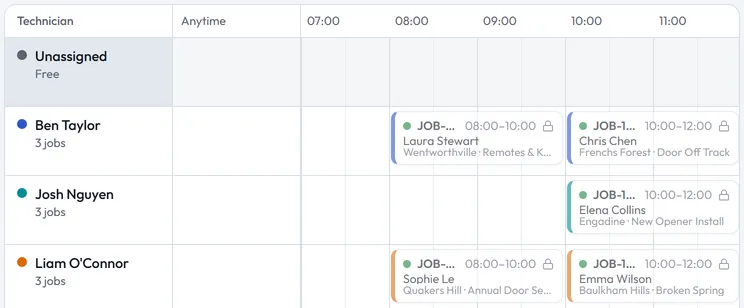
Each tech's day on the Schedule screen in Steddy. Sample jobs. Move a job and the tech confirms again
The office
Change the tech, the date or the start time, and the job goes back to the tech to accept. Until they do, the Jobs list shows it as Awaiting tech confirmation, so the office sees who hasn't confirmed.
The tech's phone
The moved job is back under Needs your OK. A tech the job was moved away from no longer sees it.
On the way, with the tech's ETA
The office
When the tech taps On my way, the job shows them en route, with their estimate in minutes. The job records the time of each step: accepted, en route, on site and finished.
Technician progress
Finished- Accepted17 Sep, 9:12 AM
- En route17 Sep, 1:41 PM
- On site17 Sep, 2:03 PM
- Finished17 Sep, 3:36 PM
Sample job JOB-1288, new opener install with Ben Taylor, rebuilt from the job's Technician progress card in Steddy. The tech's phone
On my way asks how many minutes away they are. Start when they arrive. One tap each, and nobody has to ring the van.
E. CollinsNew opener install
In progress2:00 PM – 4:00 PM · Engadine
- Accepted
- En route
- On site
- Finished
In progress. Accepted, En route and On site are done, and Finished is still to come. The buttons are Quote job and Finish job.
Sample job for an Australian business, rebuilt from the job screen in Steddy Crew. Four numbers the office starts the day on
The office
- Unassigned
- Booked jobs with nobody on them.
- Declined by tech
- A tech said no and gave a reason. The job needs someone else.
- Overdue
- Still marked scheduled, and the date has passed.
- Awaiting payment
- Done, but not paid in full.
Filter the jobs list by tech, by area, by date or by payment. It opens on today.
- Unassigned
- 1
- Declined by tech
- 0
- Overdue (scheduled in the past)
- 0
- Awaiting payment
- 5
The counts at the top of the Jobs screen, rebuilt from Steddy. Sample figures. The tech's phone
Office only. The tech sees their own day: today's jobs, and the week ahead on the Schedule tab.
See the office send a job to the tech's phone.
Fifteen minutes: we walk you through one job, from the call to the money landing, then show you what it made.