Dispatch from the office screen, not the whiteboard.
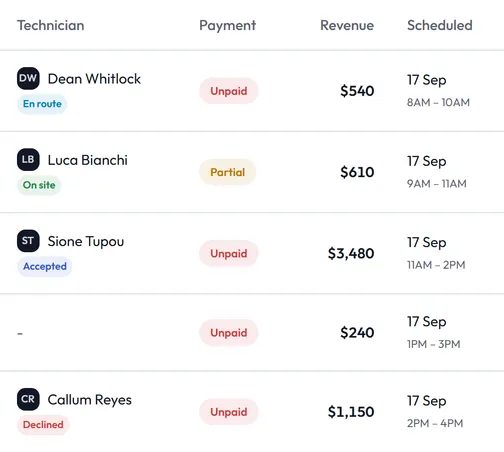
Each job gets a date, a time window and a tech. The tech accepts it on their phone, taps On my way when they leave, and Start when they arrive. The office watches the day move without calling anyone.
Fifteen minutes: we walk you through one job, from the call to the money landing, then show you what it made.
Schedule17 Sep · Day
UnassignedFree
Callum Reyes
JOB-1179 10:00–12:00
M. Ferris
Glenroy · Spring replacement
Luca Bianchi
JOB-1183 09:00–11:00
G. Teasdale
Thomastown · Cable & drum
JOB-1180 has moved from Callum Reyes to Luca Bianchi. Luca Bianchi is asked to accept it in Steddy Crew, and Callum Reyes no longer sees it. Luca Bianchi now has 2 jobs and Callum Reyes has 1.
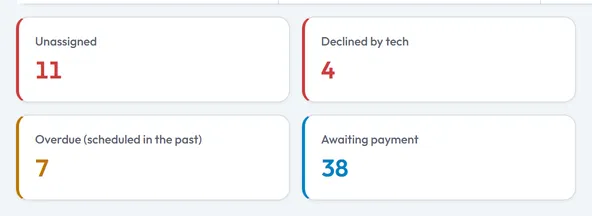
Four numbers the office starts the day on
- Unassigned
- Booked jobs with nobody on them.
- Declined by tech
- A tech said no, and gave a reason. The job needs someone else.
- Overdue
- Still marked scheduled, and the date has passed.
- Awaiting payment
- Done, and not paid in full.
Filter the jobs list by tech, by area, by date or by payment. It opens on today.
When the schedule changes
- Move a job and the tech confirms again
- Change the tech, the date or the start time, and the job goes back to the tech to accept. The office sees who hasn't confirmed.
- A decline comes with a reason
- And once a tech has started a job, they can't decline it.
- On the way, with the tech's ETA
- When the tech taps On my way, the job shows them en route, with their estimate in minutes. Accepted, en route, on site and finished, each with the time it happened.
- Booked from the lead
- Turn a lead into a job: pick the date, the time window and one of the techs who work that area.